Quick Key Allocations
Quick Key Allocations screen allows the user to setup combinations of default G/L Accounts and Dimensions to be used on Journals and Documents to ensure greater accuracy and timeliness during data entry.
Create the Allocation
Search for Quick Key Allocations and select the related link.
Select New on the ribbon.
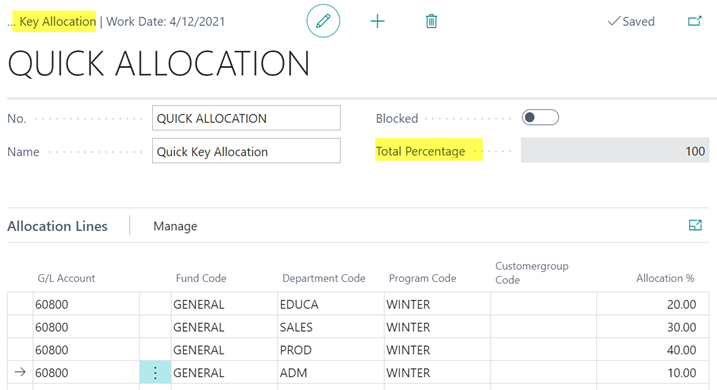
Enter a descriptive No. and Name.
Populate the lines with the G/L Account and Dimensions.
1.Allocation %: Enter a percentage to be allocated for each line.
The Total Percentage must equal 100%.
Note the G/L Account is not required. The user may enter a combination of Dimensions to be used on Documents and Journals to populate the Dimension fields correctly.
Using Quick Key Allocations
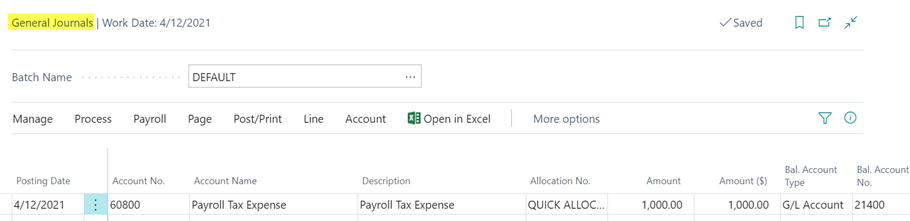
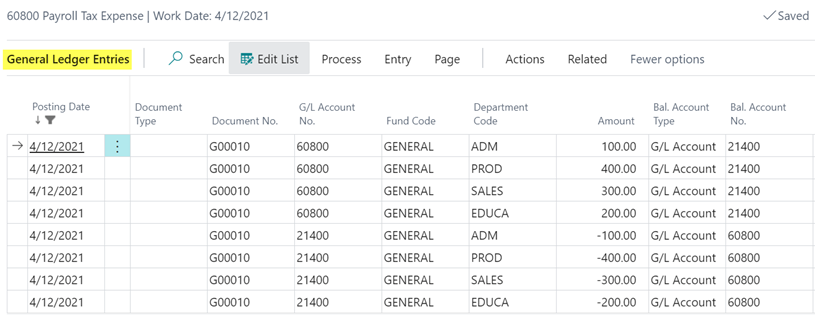
When using Quick Key Allocations on Journals and Documents the allocation number is entered in theAllocation No. field on the line. When the Journal or Document is posted the line will be allocated per the allocation selected.